

How to Make a Pet-to-Human Transformation Video
Make a fictional pet-to-human transformation video from one clear cat or dog photo with AI Genjutsu.
Use AI Genjutsu’s pet-to-human template to turn one cat or dog photo into a short, imagined human transformation. The human character is fictional and loosely inspired by the pet; it is not a prediction or a reveal of a real identity.
1. Choose one clear pet photo
Pick a photo you have permission to use that shows one pet alone. Look for a front-facing view, a clear face, a visible full body and even lighting. Avoid photos containing people or several pets.
If the face is obscured or the body is cut off, choose another source photo. The photo is your starting scene, so make the pet easy to distinguish from the background.
The template accepts JPG, PNG, WebP and iPhone HEIC/HEIF files up to 10 MiB, with each side at least 300 pixels. Prepare a file that meets these limits before adding it.
2. Add the starting photo
Open the Pet to human AI video template and add your chosen image in the Starting photo area. One starting photo is required before generation.
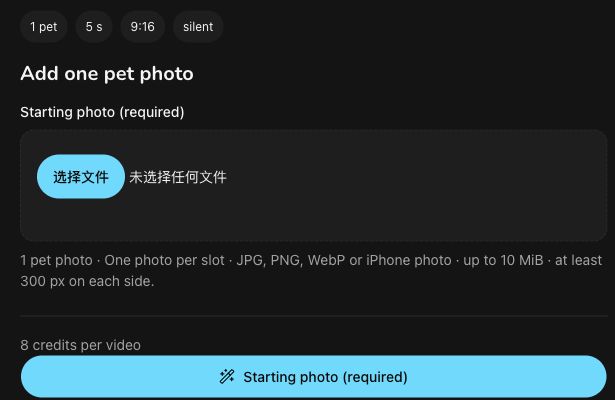
The screenshot shows the real, empty input interface during preparation. No subject photo has been added, and it is not a generated video.
The template supplies the transformation process; you do not need to write a character prompt. It may draw loosely on details such as coat color or eyes, but resemblance and matching features are not guaranteed.
3. Check the format and credit quote
Review the displayed format and credit quote before selecting Generate. During the November 13 interface check, the template listed Kling 2.6 Pro and Seedream 5.0 Flash and showed a five-second, 1080p, vertical 9:16 MP4 with no audio.
The displayed quote was 8 credits. Check the actual quote for your task when you use the template; the figure here records the checked interface. Once your photo is added and you have reviewed the details, select Generate when ready.
4. Watch and download the clip
Follow progress in Your pet to human AI video. You can return to the same task, and your videos are available from My videos.
When the clip finishes, watch the full transformation before sharing. Check the pet’s framing, the transition and the imagined human appearance, then decide whether the clip suits your post. Download it and check the saved file before sending it.
The template’s clip is silent. If you want music or text, add those in a separate editor before posting.
About this guide
Drafted by GPT-6.1 Terra and independently copy-edited by AI. Independently reviewed by Codex for facts, links and images, and published by the product operator. The interface was checked on November 13, 2026; the screenshot shows the real UI. No subject photo was uploaded, no new video was generated, and no purchase was made. Output quality was not tested. Official product pages support the feature descriptions, not output performance.
Pet to Human FAQ
Is the human version a real person?
The template imagines a human character from your pet photo. The result is an AI interpretation of the pet.
What photo should I upload for a pet to human AI video?
Use one sharp, evenly lit photo of one pet, alone in the frame. Works best: one pet, face clear, eye level, good light. JPEG, PNG, WebP or iPhone photos (HEIC/HEIF) up to 10 MiB per photo work, at least 300 px on each side.
How much does Pet to Human cost?
8 credits per video, shown before you generate. A 40-credit pack costs $5.99 (excluding tax) and covers five videos.
What do I get?
A 5-second, 1080p, vertical 9:16 MP4 without sound, made with Kling 2.6 Pro and Seedream 5.0 Flash. Download it from My videos and add your own music when you post.
What details carry over from my pet?
The template aims to reflect coat color and facial details in the human styling. The interpretation varies with the photo.
Does pet to human work for any animal?
It's made for cats and dogs. Other pets may not transform well.
Can I use a photo with people in it?
Use one pet alone in the frame. People or several pets make the subject harder to identify.
What if my pet to human AI video fails?
Your 8 credits come back automatically. A successful video you don't like is not refunded, so check the photo tips first.