

How to Make an Earth Zoom-Out Video From One Photo
Choose one photo, make a short Earth zoom-out effect with AI Genjutsu, and preview your vertical clip before sharing.
An Earth zoom-out effect gives a short reel a simple sequence: start close to a person or pet, then pull back toward Earth. With AI Genjutsu’s Earth Zoom Out template, you supply one starting photo and download a short vertical video when it is ready.
This is an AI visual effect. The generated surroundings do not establish the subject’s real location. Results depend on the starting photo, so preview the finished clip before sharing.
1. Pick one suitable photo
Choose a photo of one person or one pet, with a sharp, centered, front-facing subject in even light. A clear outdoor scene is the recommended starting point. Avoid group photos and shots where the subject is very small, blurry, or dark.
Use a photo you have the right to upload and share. The current template accepts JPG, PNG, WebP, and iPhone HEIC or HEIF files up to 10 MiB, with each side at least 300 pixels.
2. Open the template and add your photo
Open the template and choose your image in the required Starting photo field. The template supplies the effect from that image; you do not need to enter a location, route, or written prompt.
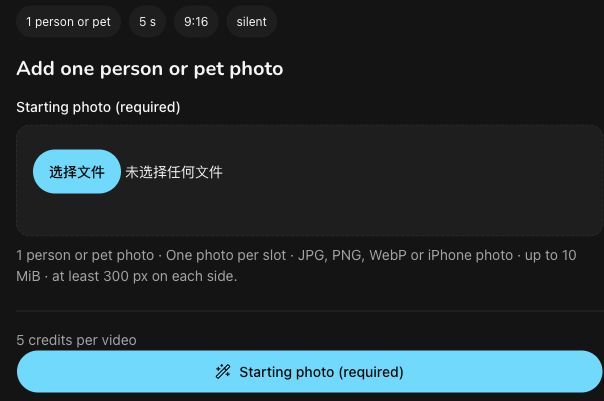
The empty input screen and its current file requirements. No subject photo is loaded, and this is not a generated zoom clip.
3. Review the format and current quote
The current template uses Seedance 2.0 Mini and specifies a five-second, silent MP4 at 720p in vertical 9:16 format. The form shown here quotes 5 credits. Check the current panel and credit quote before selecting Generate, as the displayed details may change.
When you are ready, select Generate. Progress appears in Your Earth zoom out AI video. You can leave the task and return to it later, and find your videos in My videos.
4. Watch and prepare the clip for sharing
Play the finished video before downloading it. Check whether the person or pet remains recognizable and whether the transition feels continuous enough for your intended post.
Download the clip and check that the saved file plays. Add a caption or music in your posting app if you want them. Because the template specifies silent output, preview the final post with any added audio before sharing.
About this guide: This guide was drafted by GPT-6.1 Terra, independently edited by AI, and independently reviewed for factual accuracy by Codex before publication. It is published by the product operator. The interface was checked on November 14, 2026. The figure shows the real empty UI; no subject photo was uploaded, no new video was generated, no purchase was made, and output quality was not tested.
Earth Zoom Out FAQ
What is the Earth zoom out effect?
A single continuous shot that starts close on a person and zooms out through the city and the sky to show Earth from space.
What photo should I upload for an Earth zoom out AI video?
Use one sharp, evenly lit photo of one person or one pet, one subject per photo. Works best: one person or pet, outdoors or a clear scene, subject centered. JPEG, PNG, WebP or iPhone photos (HEIC/HEIF) up to 10 MiB per photo work, at least 300 px on each side.
How much does Earth Zoom Out cost?
5 credits per video, shown before you generate. A 10-credit pack costs $1.99 (excluding tax) and covers two videos.
What do I get?
A 5-second, 720p, vertical 9:16 MP4 without sound, made with Seedance 2.0 Mini. Download it from My videos and add your own music when you post.
Can I start the zoom out from my pet?
The template accepts one pet photo as the starting subject. Results vary with the photo.
Does the zoom show my real location?
The zoom is an AI-generated scene rather than a geographic map or location lookup.
Do I need an outdoor photo?
An outdoor photo or a clear scene with the subject centered works best. Avoid very dark indoor shots.
What if my Earth zoom out AI video fails?
Your 5 credits come back automatically. A successful video you don't like is not refunded, so check the photo tips first.