

How to Make a Crowd Freeze AI Video From One Photo
Make a crowd freeze AI video from one person or pet photo. Prepare a clear full-body image, check the fixed template, and review the silent clip.
Choose one clear, full-body photo of an adult or a pet to make a crowd freeze AI video. AI Genjutsu’s fixed Crowd Freeze template creates a busy street scene in which the crowd appears to stop mid-step while your subject keeps walking. Once the clip is ready, watch the whole download before deciding whether to share it.
Pick a clear full-body photo
Use a photo you have permission to submit of yourself, another adult who has agreed, or your own pet. The service is for people aged 18 or older. It excludes photos of minors, celebrities, and other public figures. The service and its AI providers process the photo you submit. AI Genjutsu Acceptable Use Policy · Privacy Policy
Look for a standing, front-facing subject in even light. You should be able to see the face and full outline, including hands and feet or paws. Check that furniture or another object isn’t hiding the legs. If you’re choosing between a close portrait and a clear full-body photo, use the full-body photo. Skip group shots, seated poses, and images in which the subject is small, dark, or blurry. The template supplies the street and crowd, so an ordinary photo taken in a safe place is enough.
Upload one photo and confirm the quote
Open Crowd Freeze. If you’re signed out, read the Terms and Acceptable Use Policy on the sign-in screen and sign in only if you agree. You must be signed in before uploading or generating. In Starting photo, choose one JPG, PNG, WebP, HEIC, or HEIF file. It can be up to 10 MiB, and both width and height must be at least 300 pixels. If the file is too large, export a smaller copy and check its width and height before using it. Open the copy to make sure the whole subject is still visible and in focus. Crowd Freeze template
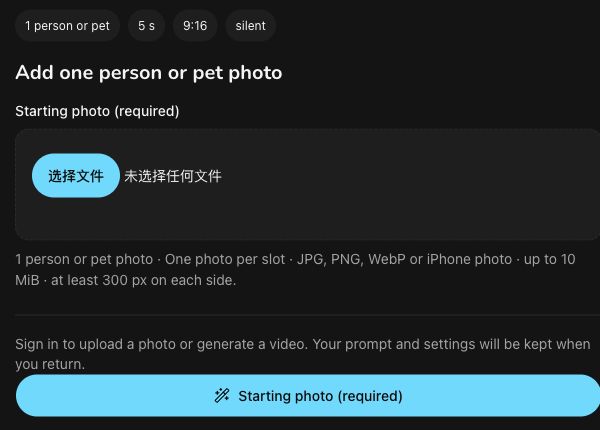
The screenshot shows the Crowd Freeze input panel before a photo is selected or a clip is generated.
The current template quotes five credits for a silent, five-second MP4 in vertical 9:16 at 720p. Confirm the format and credit quote on the page before selecting Generate. The template sets the scene and timing.
Follow the same request while it’s pending. If you leave the page, return to the same request or open My videos with the account you used to generate it. Download the MP4 once it’s ready. My videos
Watch the whole clip before sharing
Play the downloaded file from the first frame to the last. Can you recognize the adult or pet throughout, and is it clear that they’re moving while the crowd appears frozen? Watch the subject’s face, body outline, hands or paws, and legs. Pay attention to each step and look for feet sliding or floating, objects warping, or the crowd flickering.
If the subject changes shape or the effect is hard to read, keep the photo and skip sharing that clip. A different photo with a clearer view of the subject is one option if you decide to try again at the displayed price. If the download looks fine but the posting app cuts off the subject or covers their feet, adjust the app’s crop or text placement and preview again. If the framing still fails, choose another source photo. Identify anything you share as AI-generated.
Frequently asked questions
What if the request fails?
Check the original request for a failure message. AI Genjutsu says it returns generation credits for failed or blocked jobs. Acceptable Use Policy
Can I add music or direct the crowd?
Crowd Freeze runs a fixed scene, with no custom prompt or controls for crowd positions. Use a separate posting or editing app for captions, edits to the finished clip, or music you have rights to use.
What happens to the photo I upload?
AI Genjutsu says it deletes the source photo when the job ends and keeps outputs private by default. It may retain separate account and transaction records. Privacy Policy
This AI-assisted guide comes from the team that operates AI Genjutsu. The interface check ended before any photo upload, video generation, or output testing.