

How to Make a Birthday Greeting Video From One Photo
Make a short birthday greeting from one photo with the Champagne Birthday template, then add your message and music in a posting app.
You can turn one photo into a short birthday greeting with the Champagne Birthday template. It creates a vertical party scene with balloons and a champagne bottle, so you do not need those props in the original photo. After downloading the clip, you can add a name, birthday message, or music in your posting app.
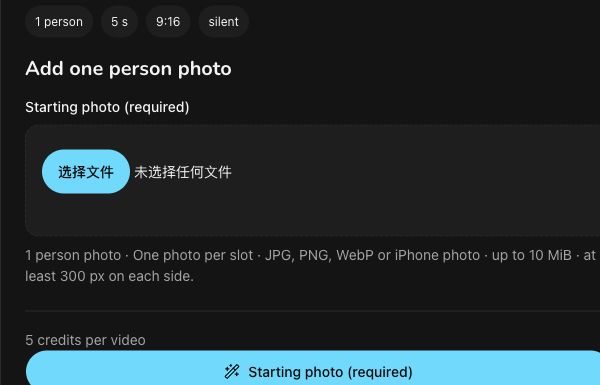
Actual Champagne Birthday upload area, November 10, 2026. The example quote is 5 credits per video; no photo was submitted or video generated for this guide.
Choose a suitable photo
Use a photo of one adult with their permission. A waist-up photo of a smiling person with both hands visible is a practical starting point. Avoid group photos and pictures where the hands are hidden or cut off. Choose an appropriate adult subject because the template includes champagne imagery.
The starting photo can be a JPG, PNG, WebP, or iPhone photo. It must be no larger than 10 MiB and measure at least 300 pixels on each side.
Create the birthday clip
The current template’s listed output is a five-second, vertical 9:16, silent 720p MP4.
-
Open the Champagne birthday AI video template and sign in before uploading.
-
Under Starting photo (required), upload your chosen photo.
-
Check the current credit quote, then select Generate. The listed price was 5 credits per video when the interface was checked on November 10, 2026.
-
Follow the progress and look for the result under Your champagne birthday AI video on the template page. You can also use My videos to find your task history.
When the clip is available, review the person’s appearance and the party scene to decide whether it suits your greeting.
Add your message
Download the result, then open it in the app where you plan to post or share it. Add a short message such as “Happy Birthday, Alex!” and choose music there if you want it. Preview the text placement so it stays readable over the video.
The template uses a fixed party scene and does not offer a native name or birthday-text customization control. Plan to add those personal touches in your posting app after download.
Disclosure: This site-operated guide was drafted and edited with AI assistance and received independent AI factual review. The interface was checked on November 10, 2026; no new generation, purchase, result download, or result-quality test was performed.
Champagne Birthday FAQ
Can I make a champagne birthday video for my friend?
Yes. Use one clear photo of one person to make a birthday message.
What photo should I upload for a champagne birthday AI video?
Use one sharp, evenly lit photo of one person. Works best: one person, waist up, smiling, hands visible. JPEG, PNG, WebP or iPhone photos (HEIC/HEIF) up to 10 MiB per photo work, at least 300 px on each side.
How much does Champagne Birthday cost?
5 credits per video, shown before you generate. A 10-credit pack costs $1.99 (excluding tax) and covers two videos.
What do I get?
A 5-second, 720p, vertical 9:16 MP4 without sound, made with Kling 2.6 and Seedream. Download it from My videos and add your own music when you post.
Does the video show champagne?
Yes. The scene has confetti, balloons and a champagne pop as part of the party look.
Do I need balloons or a bottle in my photo?
No. The template adds the balloons and champagne bottle to the generated scene.
Can I add a name or 'Happy Birthday' text?
Not inside the video yet. Add text and music in your app when you post.
What if my champagne birthday AI video fails?
Your 5 credits come back automatically. A successful video you don't like is not refunded, so check the photo tips first.