

How to Make an AI Millionaire Video From a Pet Photo
Make an AI millionaire video from one pet photo. Choose a clear image, use the fixed template, and review your silent vertical clip before sharing the joke.
A picture of your dog sitting by the back door or your cat staring straight at the camera can be enough to start an AI Millionaire video. AI Genjutsu’s fixed template takes one photo of one person or pet and supplies the scene. The product page describes a dressed-up scene with falling money. Use a photo of your own pet for a fictional bit about sudden riches. Open the AI Millionaire template
1. Choose a photo where your pet is easy to recognize
Look for a sharp, front-facing photo that shows your pet’s upper body or the whole animal. Even light and a simple background make it easier to see the shape of the ears, muzzle and body. If you have a choice between a dog in deep shadow under a table and the same dog sitting in soft window light, start with the second photo.
Open the photo at full size before uploading. A picture that looks sharp as a thumbnail may show motion blur around the eyes or ears. If your pet has distinctive markings, like a white patch between the eyes, check that you can see them clearly. Skip group photos and shots where your pet is tiny in the frame. Cropping can remove distracting furniture, but it can’t bring a blurred face into focus. An ordinary photo you already have works as a starting point. Leave the costume and scenery to the template.
Use a photo of your own pet that you have the rights to submit. The service is for users aged 18 and over. Its rules also prohibit photos of minors and public figures. AI Genjutsu acceptable use policy
2. Check the file and open the template
The template takes one photo per slot. It accepts JPEG (JPG), PNG, WebP and iPhone HEIC or HEIF files up to 10 MiB. Both sides must be at least 300 pixels. Check the file you actually plan to upload, especially if you cropped a copy.
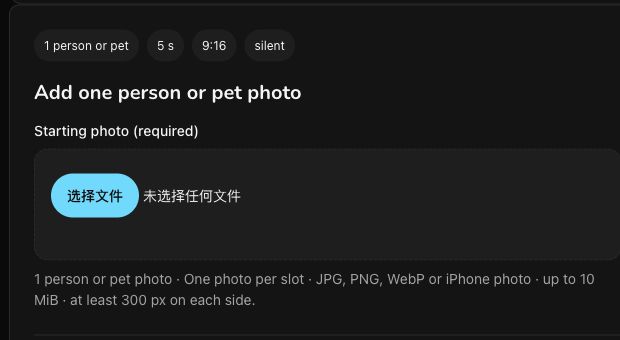
Interface screenshot, not a generated result.
If you’re signed out, choose Sign in on the template page before uploading. Look for the notice “Continue at sign-in to accept the current Terms.” If it appears, choose Continue on the template page to go to sign-in. Review and accept the current Terms there before proceeding. Use Starting photo (required) to select your file.
3. Generate your AI millionaire video and download it
The template currently lists five credits per video. Check the quote shown for your request before choosing Generate. The current output is a five-second, 720p, vertical 9:16, silent MP4.
When the clip is ready, download the MP4. If you left the page, use the same account to check the task or download its result in My videos. Look up an existing request that may still be processing before submitting another. My videos
4. Play the downloaded file from start to finish
Watch it once at normal speed to see whether you recognize your pet as the scene moves. Then pause at the start, somewhere in the middle and on the final frame. Compare the clip with your source photo. Follow the shape of the eyes and muzzle and see whether a distinctive fur patch stays in the right place. Watch the legs, paws and any visible tail as the camera moves or cash passes across the frame. Check whether the face stays legible and whether any changes pull attention away from the joke.
If your pet is hard to recognize, revisit the source before you decide whether to try again. A photo with a clearer face gives you a better reference for judging the next clip. You can also simply keep a strange-looking take to yourself. For any new request, confirm the displayed quote again.
5. Share it as a fictional clip
If you want text or sound, add it after downloading in a separate video or posting editor. “Promoted to head of naps” works as a short caption for a cat lounging in the scene. For sound, use audio you created or have permission to use for the post. Keep the AI-generated label easy to see and let the caption make the fiction clear. Skip wording that reads like a claim about actual earnings or a brand endorsement.
Frequently asked questions
Does an AI millionaire video include sound?
The current output is silent. Add your own caption or appropriately licensed audio in a separate posting editor after downloading the clip.
Can I crop myself out of a photo with my pet?
You can prepare a copy that shows just your pet if its face and body are still easy to see. Check that the cropped file still meets the size and dimension limits. If the crop leaves half the muzzle out of frame, look for another photo.
Do I need to shoot the source photo vertically?
The 9:16 spec describes the video you’ll download. For your starting photo, focus on a clear view of your pet with enough space around its head and visible body. A tight crop can cut off features you want to recognize in the clip.
What if my phone photo is over the size limit?
Make a smaller copy in the photo editor you already use. Check that the saved copy fits within 10 MiB and still measures at least 300 pixels on both sides. Open it and look at your pet’s eyes and markings before uploading. Keep the full-size original so you can make a different copy if you need to.
Will my AI millionaire video match the example?
The example illustrates the scene. Your pet’s appearance and details such as the clothes and props can vary. If you’ll add a caption later, write it around the overall joke so it still works if a particular prop never appears.
Written by GPT-6.1 Terra for Springtide Labs, LLC, the operator of AI Genjutsu. Independently AI copyedited. Independently AI fact-checked before publication. Interface and documentation checked on 22 November 2026. No source photo was uploaded, no new video was generated, and no result quality was tested.